Calculate bike weight#
Download the bike model used in this example and import it into a new project to work on.
Download the model:
Bike Model.Open the SAM editor in your browser and select the desired organization (for example, MyOrga).
Select New Project > SysML V2 > Import File.
Select Choose File for the File to import option.
Select the
bike.xmifile that you just downloaded. The project name is automatically set tobike.Click Import and wait for the project to load.
You can now work on this bike model.
Calculate weight#
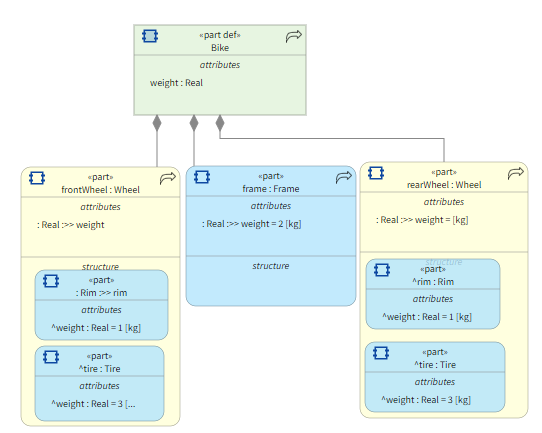
The bike weight is the sum of the frame weight and the weight of all wheel component elements. Thus, you want to calculate the sum of all blue elements in the model:
Step 1: Load the project#
Note
Ensure that you have installed PySAM SysML2. If not, see Installation.
Before loading the project, create a connector and a project manager.
To obtain the required data, see Find organization ID and Find authentication token.
# Import connector and model manager
import requests
from urllib3.exceptions import InsecureRequestWarning

from ansys.sam.sysml2 import AnsysSysML2APIConnector, SysML2ProjectManager

# Used to disable warnings
requests.packages.urllib3.disable_warnings(InsecureRequestWarning)

# Create your connector for the SAM Server
ansyssysml2apiconnector = AnsysSysML2APIConnector(
    server_url="<SAM Server URL>",  # Your SAM server base URL
    organization_id="<Orga ID>",  # The organization ID
    token="<Token>",  # Your authorization token
    use_ssl=False,  # If the server hasn't a valid SSL
)
After logging in, load the bike project.
Note
To load a project, you need its ID. Find it in the editor’s URL.
project_manager = SysML2ProjectManager(connector=ansyssysml2apiconnector)

my_bike_project = project_manager.get_scripting_project("<Bike Project ID>")
project_manager = SysML2ProjectManager(connector=ansyssysml2apiconnector)

my_bike_project = project_manager.get_sysml_project("<Bike Project ID>")
For more information about the project object, see
Project in the API reference documentation.
Step 2: Calculate bike weight#
After loading the project, get the Bike element. As explained in
Access methods, there are many ways to get an element. This code uses dot notation:
bike = my_bike_project.get_root_package().Structure.Bike
bike = my_bike_project.get_root_package().get("Structure").get("Bike")
To calculate the bike weight, sum the weight of all blue elements in the model:
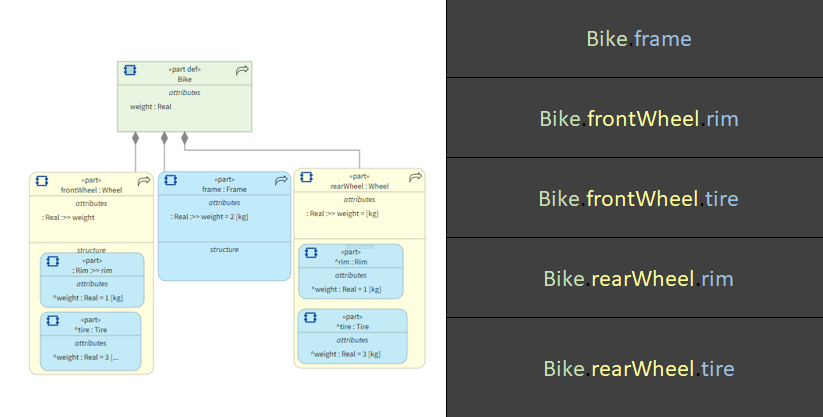
To get the weight of each piece, use the weight attribute with dot notation:
bike_weight = (
    bike.frontWheel.rim.weight.get_value()[0]
    + bike.frontWheel.tire.weight.get_value()[0]
    + bike.rearWheel.rim.weight.get_value()[0]
    + bike.rearWheel.tire.weight.get_value()[0]
    + bike.frame.weight.get_value()[0]
)
bike_weight = (
    bike.get("frontWheel").get("rim").get("weight").get_value()[0]
    + bike.get("frontWheel").get("tire").get("weight").get_value()[0]
    + bike.get("rearWheel").get("rim").get("weight").get_value()[0]
    + bike.get("rearWheel").get("tire").get("weight").get_value()[0]
    + bike.get("frame").get("weight").get_value()[0]
)
Print the bike weight:
print(bike_weight)
You now have the total bike weight.